Everything your workforce did,
on one screen.
Praetorium is the window and the switchboard for your Agentic Workforce. It shows what ran, what it claimed, what it actually verified, and the handful of questions only you can answer. Every number on it says whether it was measured or guessed. It runs on your own Mac, and its iPhone app puts the questions that need you in your pocket.
The panel, rendered.
The window is wider than your screen — drag it sideways.
| Started | Duration | Output | Verdict | Returned |
|---|---|---|---|---|
| 08/19 06:17 AM | 12m 04s | 3,412 B | Full | Overnight sweep — 6 voicemails triaged, 2 quotes drafted |
| 08/19 09:17 AM | 4m 51s | 2,108 B | Full | Dispatch board rewrite drafted after the Summerlin cancellation — staged for Kyle |
| 08/19 12:17 PM | 1m 09s | 214 B | Thin | Nothing to do — no new calls since 09:17 |
| 08/19 03:17 PM | 18m 33s | 5,884 B | Full | AR chase list — 9 invoices past 30 days, drafts staged for Kyle |
| 08/18 09:17 PM | 26m 12s | 288 B | Thin | Ran twenty-six minutes and returned a sentence. Flagged. |
| 08/18 06:17 PM | 0m 46s | 0 B | Failed | Scheduling system unreachable — retried clean at 6:32 PM |
Sagebrush Heating & Air does not exist. We built the demo data rather than screenshot a client's panel, because a real one renders a real company's calls, invoices and open questions. The screenshots below come from the real apps, fed example work we made up.
Drawn by the apps themselves.
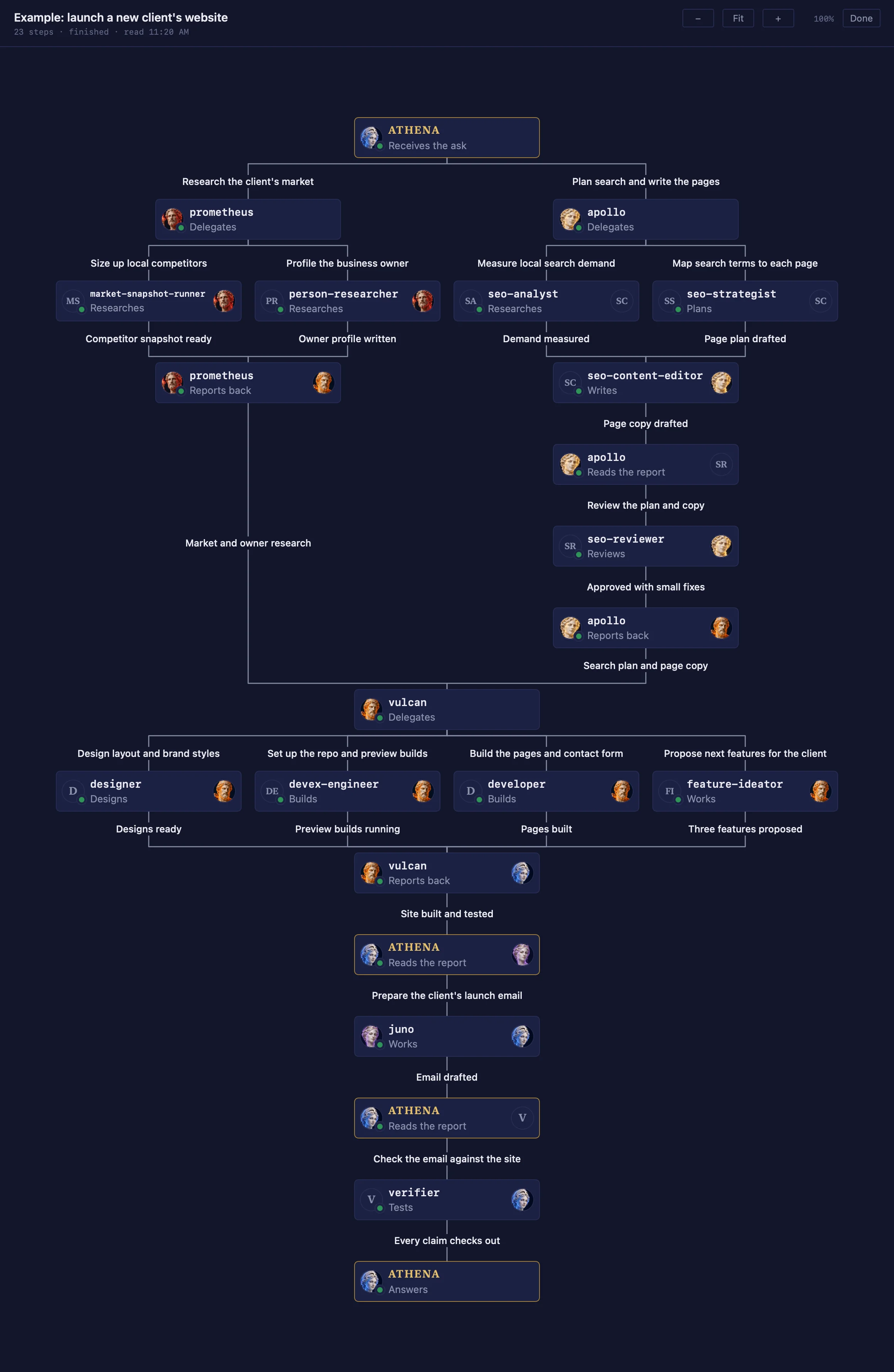
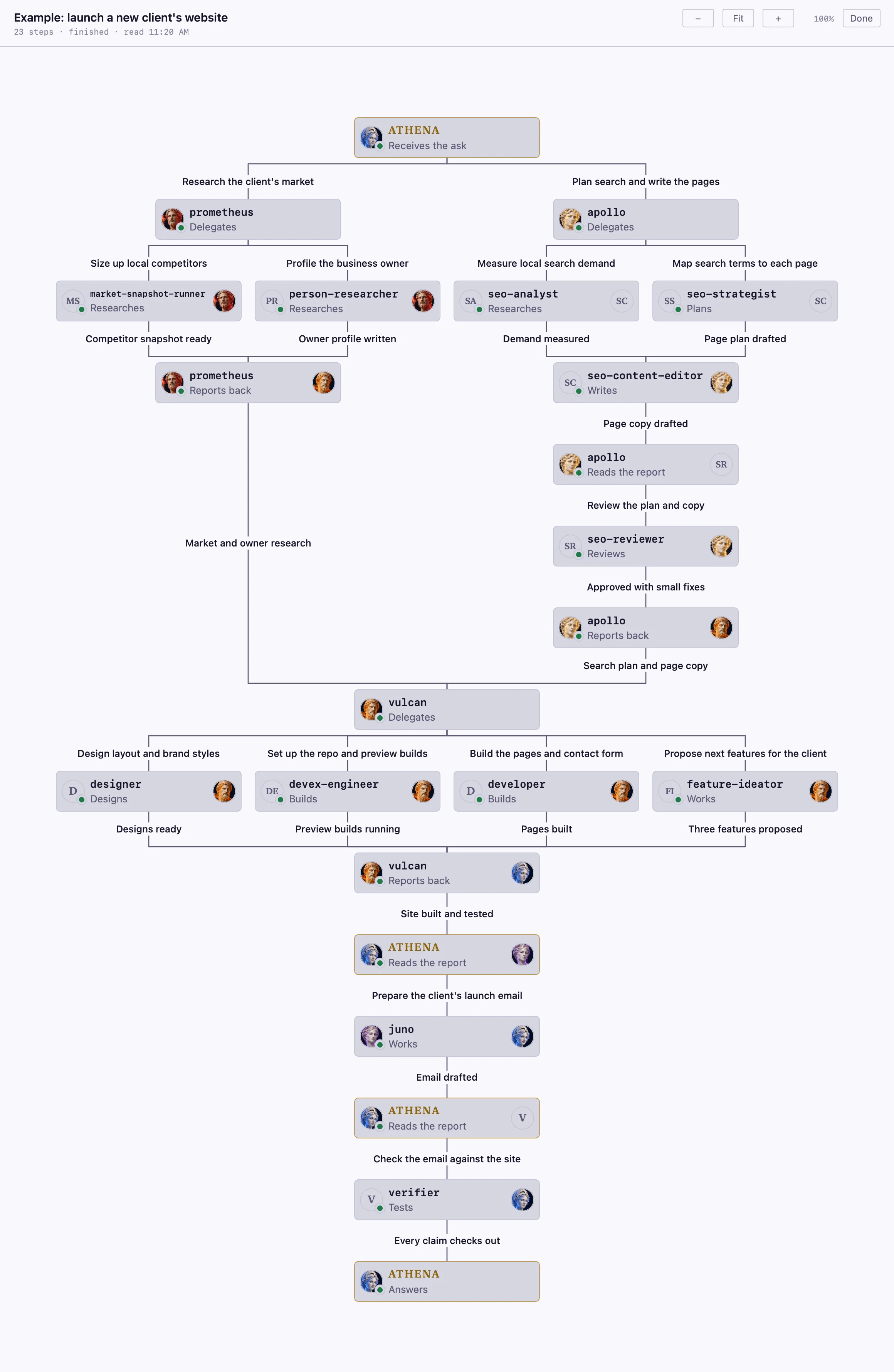
The handoff map
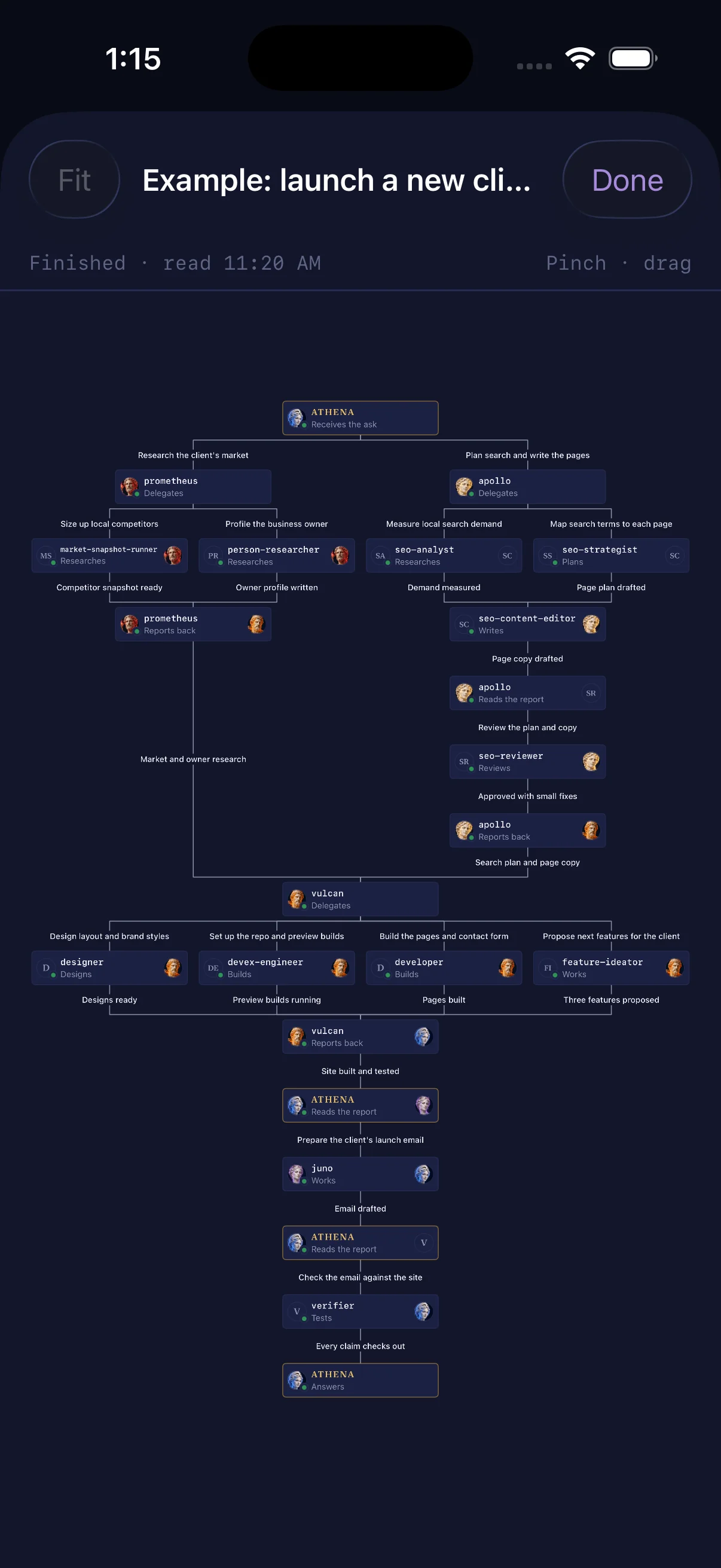
Click a session and the panel draws how the work moved. Athena takes the ask at the top, hands it to directors, each director hands it to agents on its bench, and every report comes back up before she answers at the bottom. Each step shows the agents’ portraits. The task here is an example we made up: launching a new client’s website. Read it top to bottom for the order it happened; steps side by side ran at the same time, so the two research branches work in parallel and both feed into the build below them. The labels going down are what each agent was asked to do. The labels coming back up sum up what it reported.
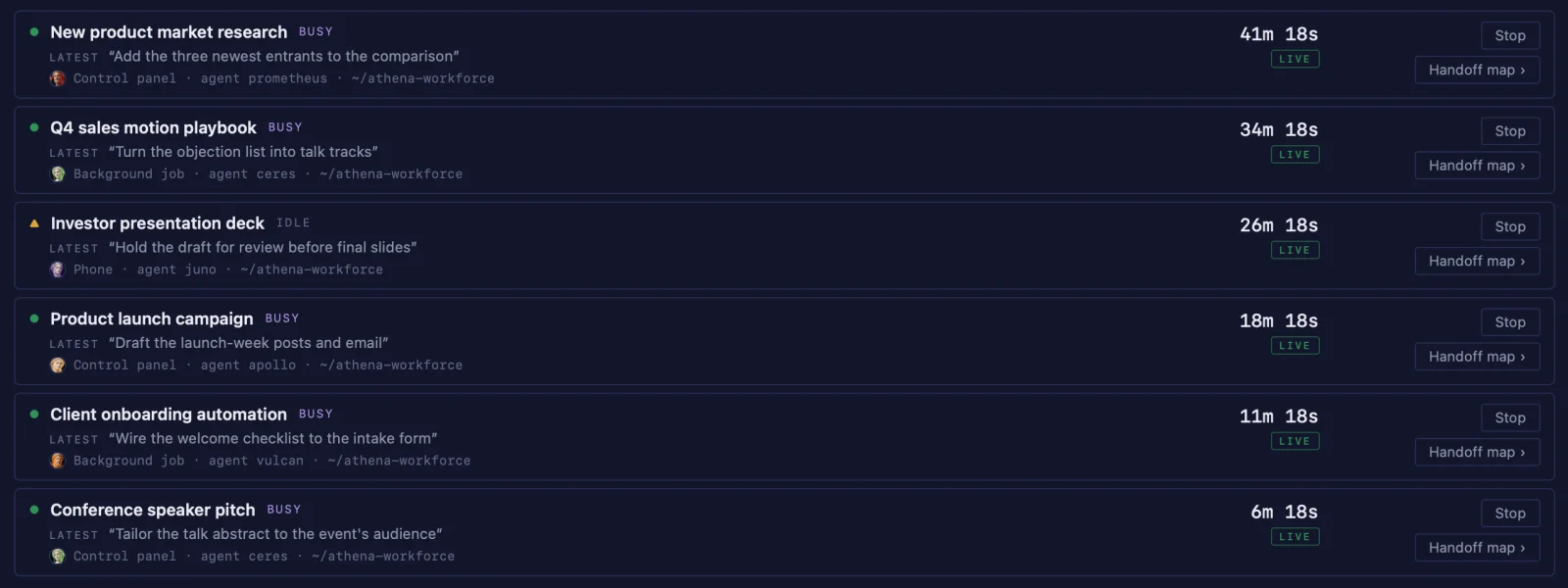
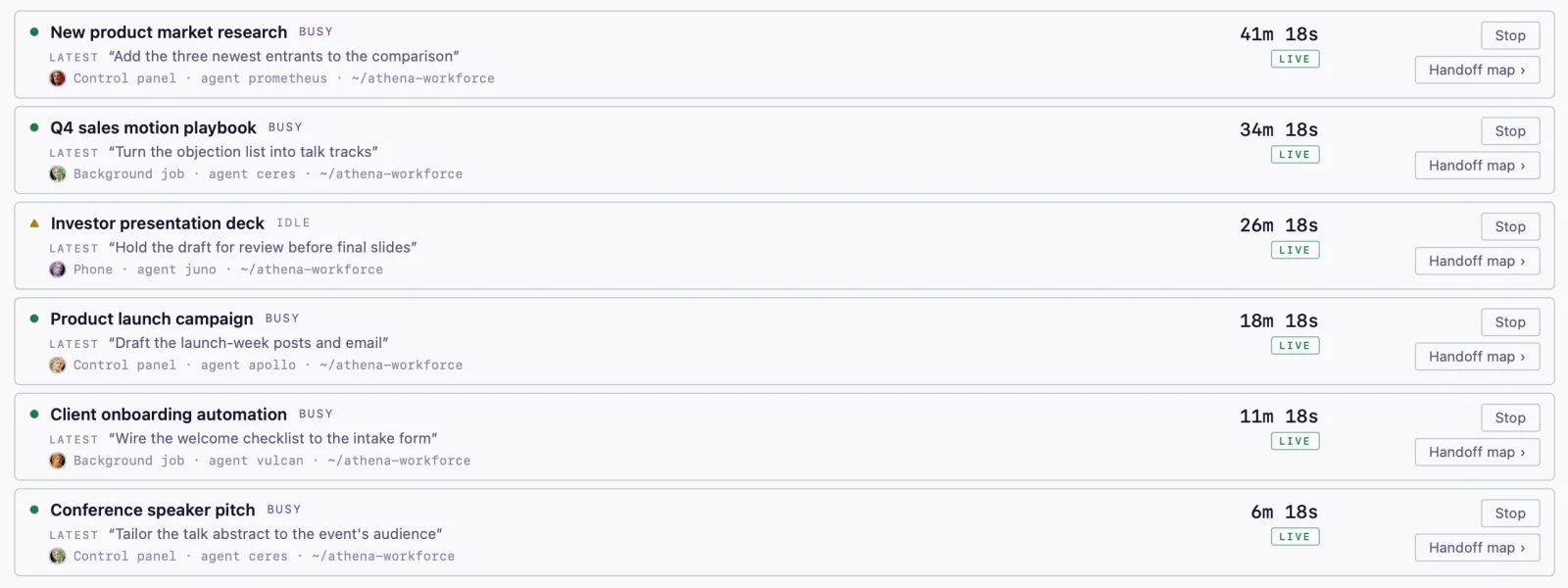
Seven views, one window.
The panel, in your pocket.
Answer the questions waiting on you.
The same queue the panel shows, with the same chips and the same free-text line. Your answer is written down on the Mac before anything acts on it — and until it has been, the phone says so plainly rather than showing it as sent.
Talk to your chief of staff.
Ask her something from the phone and she answers from what she can actually see. A real question is real work, so a reply is not instant — the screen tells you where yours is in the line instead of leaving you to wonder whether it arrived.
See what is running right now.
The same Live list, with the same summary of what each session was asked and the same handoff map, which you pinch and drag to read. Pull down and the phone reads your Mac. What comes back is a moment that has already passed, and the screen says how old it is. Nothing on it quietly refreshes itself, because a number that ages without telling you is worse than an empty one.
Your phone talks to your Mac.
You pair it once, in person, from the Mac itself. After that the phone talks to that one machine and nothing else: there is no service in the middle, and nothing of yours is kept anywhere but your own two devices. Lose the phone and you pair a new one — the old one stops working the moment you do.
The rest stays on the desk.
The phone carries the half that cannot wait. The run history, where the week's work went, and the places two directors disagreed stay on the Mac, where there is room to read them properly. A small screen is for deciding, not for auditing.
The phone above is drawn on this page, not photographed — same invented company as the panel.
A number that admits what it is.
A panel that mixes measurements, inferences and guesses without saying which is which is worse than no panel at all.
It was measured.
Read from the machine or the record at the moment you looked at it. This is the default, and it deliberately borrows the healthy color rather than an alert color — a fact should not read as a warning.
The panel worked it out.
Its own reading of something written in prose. Defensible, and still an inference. Where work went this week is derived; the fact that a pass ran is not.
An agent guessed.
Hours displaced, effort saved, time back. Worth seeing and never worth confusing with a measurement, so it is shown and labeled instead of quietly rounded into a headline.
There is not enough yet.
A placeholder standing in for data that does not exist in useful quantity. It switches to a real reading the moment there is one. A dashed border, on purpose — it should not look finished.
Why this matters more than it sounds.
The easiest way for an automation dashboard to lie is to render a guess in the same typeface as a fact. "Fourteen hours saved" and "thirty-eight files written" are not the same kind of claim, and a panel that presents them identically has taught you to trust both, or neither.
Color is never the only cue.
Green and amber are the pair color-blind readers confuse most reliably, and access status is the one indicator that must never be misread. So every status mark is a distinct shape before it is a color, and it is never shown without the word beside it. Every provenance badge spells itself out too. The palette was re-stepped until a color-blindness check passed in both light and dark.
Answer in one tap.
An agent hits a wall and stops.
It cannot spend your money, change your prices or send anything to a customer. When it reaches one of those, it does not guess and it does not proceed. It writes the question down in plain English with the reasons behind it.
Praetorium puts it in front of you whole.
Not a notification that something needs attention — the question, the four times it came up, what happened each time, and what would change if you said yes. Enough to decide from the screen.
You tap a chip, or type five words.
"No — warmly" is a real answer, not a softener. The agent turns it into a message that keeps the relationship intact, which is the part you would otherwise have spent twenty minutes on.
The decision is written down before anything acts on it.
Your answer is recorded first. Only then does the chief of staff go and carry it out. If it cannot be recorded, she does not go — she would be acting on a decision that exists nowhere, and next week nobody could say why it happened.
The alarm is not the thing it watches.
The thing that tells you the system is broken cannot itself be the system.
A hiccup is not an alarm.
Short interruptions are normal and nearly all of them clear on their own within minutes. You are told when one doesn't. Sounding the alarm on every blip would have cried wolf six times on the panel above, and an alarm you have learned to ignore is not an alarm.
It comes to you.
The alert lands on your desk whether or not the panel is open. Nobody has to remember to check a screen to find out the workforce is still running, which is the only way you hear about a quiet Sunday failure before Monday.
What it never sees.
It never reads your passwords. The panel can tell you whether the workforce is working or has stopped. It cannot see what it signs in with, and it never asks.
It runs on your machines. A Mac app on your own computer, and an iPhone app that talks to that Mac and nothing else. Your business's data stays on the two of them. There is no cloud service behind it, no account to create, and nothing of yours held anywhere else. If your internet drops, it is still the app on your desk.
It does not message outsiders on its own. Exactly one thing reaches you — the chief of staff. Routine editorial publishing inside a strategy you approved runs through an independent review, not a sign-off on every article. Anything sent to a customer, a supplier or anyone else outside your business, and any spending, needs your specific go-ahead.
It has no opinion it hides from you. Where two directors disagreed, both positions stay on the screen. Where a number was inferred, it says so. Where there is not enough data yet, it says that instead of drawing a trend line through four points.
No client's panel is on this page. Every figure in the demo above belongs to a company we invented, the Live view shows example sessions we made up, and the handoff maps show a task we made up. We'd rather show you an honest mock-up than a screenshot of somebody's real invoices.
See it working for your business.
We build the workforce, hand you the panel, and stay on it. Bring us the job that eats your week and we will show you the loop that covers it — scoped with you before you commit to anything.